


























In today’s quick-moving world, getting people’s attention and keeping it matters a lot. How do you stand out and truly connect with your audience? One strong answer is digital signage with lively, clear content.
These are not boring screens that show the same info all day. Modern digital signage is a flexible tool that can change customer experiences, improve team communication, and drive real results. It’s about moving past plain messages and building a bright visual story that informs, entertains, and persuades.
If you want to raise your communication game and leave a strong impression, try fresh digital signage ideas. With platforms like LOOK Digital Signage, businesses can create, manage, and display eye-catching content with ease.
What Is Digital Signage and How Does It Benefit Businesses?
Digital signage means electronic screens that show images, videos, streaming media, and other information. Think of it like a modern billboard you can update in seconds, from anywhere. Unlike printed signs that go out of date fast, digital screens are easy to change and adjust. You’ll see them in retail stores, offices, schools, hospitals, and more, always able to show what people need right now.
Digital signage brings many benefits across daily work and customer touchpoints. First, it offers strong flexibility. Need to announce a flash sale, new hours, or an emergency alert? You can push updates to many screens in minutes, instead of printing and placing signs. This makes it a fast, responsive way to communicate. Second, screens grab attention. Research shows people remember digital signage better than many other media. Your messages get seen and remembered, which is important for brand awareness and promotions.
Types of Digital Signage Displays Used by Businesses
Digital signage setups vary to fit different spaces and goals. Common types include:
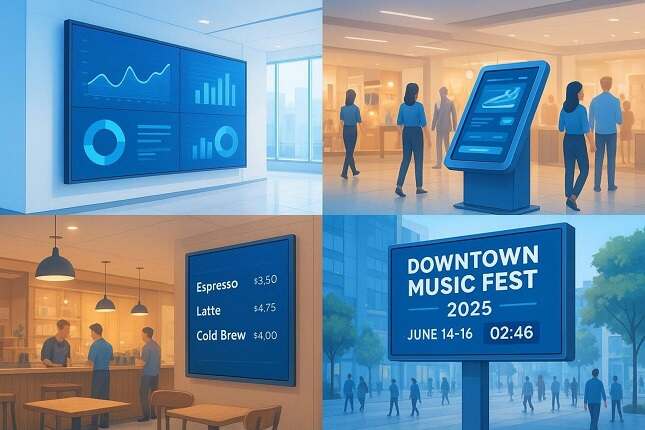
- Stand-alone displays: Single screens in stores or waiting areas showing promos, product info, or entertainment. Managed through a CMS for remote updates.
- Video Walls: Multiple screens tiled to form one large display. Great for lobbies, events, or flagship stores where big visual impact matters.
- Interactive Kiosks: Touch-enabled screens that invite people to use maps, place orders, or find info. They turn passive viewing into active use.
- Menu Boards: Popular in restaurants and cafes. Easy to update and can switch by time of day for breakfast, lunch, and dinner.
- Outdoor Digital Signage: Built to handle weather. These durable screens are good for ads, public info, and event promos outside, with high brightness.
- Desktop Digital Signage: Extends signage to employee computers, including home offices. This helps all staff stay informed, turning idle screens into useful displays.
Advantages of Using Digital Signage in Different Industries
Digital signage helps across many fields:
- Retail: It drives sales and makes the customer journey smoother. Show real-time offers, new products, testimonials, or simple configurators. This grabs attention, influences choices, cuts perceived wait times with light entertainment, and answers common questions on-screen.
- Corporate/Office Environments: Great for internal updates. Show company news, KPIs, wins, safety notes, and live social feeds. This keeps teams informed and connected, supports shared goals, and lifts morale. Use it for wayfinding, room schedules, and visitor greetings too.
- Hospitality (Hotels, Restaurants, Cafes): Hotels can display welcome messages, amenities, local tips, and event schedules. Restaurants and cafes benefit from dynamic menus, daily specials, nutrition info, and strong visuals. Digital screens can also manage queues and show wait times to cut frustration.
- Education: Schools and universities rely on signage for campus-wide updates, safety alerts, events, achievements, and wayfinding. It keeps everyone informed and connected.
- Healthcare: Show important info like wait times, health tips, safety steps, and directions in complex buildings. This eases anxiety, improves communication, and supports a better patient and visitor experience.
- Manufacturing: Use screens for production dashboards, safety alerts, internal news, and training. This can improve efficiency, help with safety rules, and keep teams aware of goals and progress.
Across these areas, digital signage is a flexible, attractive way to communicate that delivers clear value, making it a key tool for modern businesses.
Key Considerations for Effective Digital Signage Content
The real power of digital signage comes from the content on the screens. Without a smart plan, even great hardware won’t help much. Good content balances design, relevance, and clear messages that fit the audience and support business goals.
What Makes Digital Signage Content Engaging?
Strong content is like a good story: it catches the eye, holds attention, and sticks. Here’s what helps it work on screen:
- Visual Appeal: This is key. Use sharp images, clean video, and simple, modern graphics. Keep it bright and uncluttered. A striking visual beats a long block of text.
- Brevity and Clarity: Keep it short and clear. Use bullet points, short phrases, and strong visuals. People should understand at a glance.
- Relevance: Match content to the audience and place. Show menus in a restaurant, not corporate metrics. In a waiting room, show health tips or local news; in retail, highlight product benefits.
- Movement: Motion draws the eye. Use light animation, smooth fades, short clips, and live feeds. Don’t overdo flashy effects-use motion to highlight key items.
- Interactivity (where it fits): Touchscreens, QR codes, and live polls boost engagement and create a more personal experience.
- Storytelling: Even short clips can tell a story: before-and-after shots, quick testimonials, or behind-the-scenes moments help people connect.
Good content puts the viewer first, giving value in a way that static signs rarely can.
Should Content Be Updated Regularly?
Yes-keep it fresh. Stale content leads to “screen fatigue,” where people stop noticing. Changing content keeps attention.
Update timing depends on the content and the business. Live items like news, weather, or KPIs should update automatically. For promos or general info, daily or weekly updates work well. Seasonal offers, employee highlights, or tips can rotate every two weeks or monthly. The goal is to keep content new and relevant. Modern signage tools make scheduling easy, so you can plan far ahead or trigger changes from data feeds or events.
How Can Content Be Targeted to Specific Locations or Audiences?
Digital signage can deliver very specific messages. It’s not one-size-fits-all. You can target by:
- Geographic Location: Match content to each store, branch, or zone. Retail can show local offers or weather-based promos, while a hospital can post department info outside that area.
- Time of Day/Week: Schedule content by time. A restaurant shows breakfast in the morning, then switches to lunch and dinner later. Offices can show motivation in the morning and wins during the day.
- Audience Demographics: Fit content to the people nearby. A gym can show workout tips and class times; a family restaurant can show kids’ meals and simple games.
- Data-Driven Triggers: Link screens to data like inventory, sales, weather, or social trends. If it rains, a screen near the door can switch to promote umbrellas or hot drinks.
- Role-Based Targeting: In offices, send content to the teams who need it. HR updates in break rooms; sales dashboards in sales areas. This keeps info relevant.
By segmenting content this way, each message can be as effective and relevant as possible, raising engagement and meeting goals.
Tips for Designing High-Impact Digital Signage Content
Designing strong signage content takes more than dropping text and images on a screen. Plan your visuals and your message together to grab attention and deliver clear info.
Using Templates and Graphic Tools
You don’t need to be a designer to make great content. Many platforms include templates for different industries and use cases. Start with a template, then add your text, images, and brand elements.
Using templates saves time, keeps your brand consistent, and helps keep the look polished. You can also use popular design tools (many have free versions) to make custom graphics to upload. Pick tools that make it easy to edit text, images, and simple shapes. Focus on clear communication: pick readable text sizes and a clear visual order so the most important info stands out.
Best Practices for Readability and Branding
Good digital signage is easy to read and supports your brand. Keep these tips in mind:
- Prioritize Readability: Choose clear, simple fonts (sans-serif works well on screens). Use strong contrast between text and background. Avoid tiny text or fancy fonts, especially for content viewed from a distance.
- Keep Brand Consistency: Use your brand colors, logos, and fonts the same way across screens. Customize templates so they match your brand rules.
- Keep it Concise: Skip long paragraphs. Use bullets, short lines, and direct headlines. People often pass by, so fast reading is key.
- Use White Space: Don’t crowd the screen. Space helps guide the eye and makes content easier to read.
- High-Quality Visuals: Avoid blurry images or pixelated video. Use high-resolution files that look sharp on big screens.
- Call to Action (CTA): If you want people to act-visit a site, scan a code, ask staff-make the CTA clear and easy to spot.
Following these tips helps your content get noticed, get understood, and support your brand.
Planning Content Rotations and Scheduling
Scheduling matters a lot. Plan content rotations to avoid screen fatigue and keep messages fresh. This is not a one-time task; keep it active.
Group your content. What is evergreen (like your mission or FAQs) and can run less often? What needs frequent updates (like daily specials or events)? Build a calendar showing what runs, when, and for how long. Modern software lets you:
- Set Playlists: Group related items into loops.
- Schedule by Time and Day: Show certain content during peak hours or on specific days. For example, a restaurant can auto-switch menus for breakfast, lunch, and dinner.
- Geo-Targeting: Send different content to different locations based on local needs.
- Conditional Triggers: Change content based on weather, stock levels, or live news.
- Expiration Dates: Auto-remove content after it ends so nothing outdated stays on screen.
Check performance often. Are certain messages driving more scans or actions? Use analytics to improve timing and mix. A well-planned rotation keeps people engaged, delivers timely info, and gives you better returns from your screens.
30 Creative Digital Signage Ideas for Any Business
1) Rotating Product Spotlights
Don’t show everything at once. Rotate product groups or single items to keep content fresh. For example, show “New Arrivals” for 30 seconds, then switch to “Bestselling Tech,” then “Eco-Friendly Home Picks.” You can group by SKU, margin, or season. Use scheduling to automate how often items appear. This guides attention and lets you boost items you want to move or those with higher margins without overloading viewers.
2) Real-Time Service Availability and Wait Times
Clear info builds trust. Show live updates on availability-next salon slot, open checkout lanes, or current clinic wait times. Restaurants can show remaining table slots. When linked to internal systems, these screens become live tools. A hospital can show ER wait times to ease stress. This lowers perceived waits and sets clear expectations. Set up reliable data connections and backup layouts that show static info if data fails.
3) Limited-Time Promotions and Countdown Timers
Create urgency with flash sales and clear countdowns. “Offer ends in 00:01:32” pushes action. Accuracy matters-match the timer with backend data to avoid confusion. Link to your POS to confirm start and end times, and schedule visuals to go live right on time. Place these near checkout or heavy foot traffic for impulse buys. Automation helps avoid timing mistakes and keeps the experience smooth.
4) Upselling Add-Ons and Bundle Offers
Suggest helpful add-ons or bundles to raise order value. If someone buys coffee, show a pastry pairing. If they pick headphones, show a charging dock. Connect screens to basket data or common purchase combos so the logic feels natural. Show only two or three suggestions to keep it simple. Place these during pauses, like in queues or on confirmation screens, so they don’t interrupt the main purchase.
5) Customer Reviews and Social Proof
Build trust with short, real customer quotes and ratings. Show quick lines from verified reviews, with a photo if allowed. Keep each quote readable in under five seconds. Use simple graphics and soft fades to keep a smooth flow. Rotate reviews across different categories to stay relevant. Real wording works better than overly polished lines. Aim for 7-8 seconds per review in the loop.
6) Upcoming Events and Campaign Announcements
Use screens to promote events, launches, classes, or local activities. Schedule them in a central dashboard to control timing. Offices can show team events, retail can promote holiday sales, and community centers can push local festivals. Automation helps: pick a template, merge in dates and RSVP links, and send to the right screens. What used to take days can now happen in minutes.
7) Employee Recognition and Team Highlights
Lift morale by celebrating people publicly. Show birthdays, anniversaries, service awards, or monthly highlights. Include a photo, a short note, and a link to a company value. Connect HR data to your CMS so milestones appear automatically. Set each item to expire after a few days to keep the mix fresh. Public praise shows the human side of your brand and motivates teams.
8) Interactive QR Code Experiences
Invite action with QR codes that lead to discounts, product pages, surveys, or exclusive videos. Guide attention to the code with motion or contrast. Create landing pages that match the on-screen look for a smooth handoff. Use short-lived tracking links to measure scans and conversions. Update every 10-14 days to keep interest high. This turns a static screen into an entry point for deeper engagement.
9) Weather-Triggered Localized Content
Make messages feel relevant by tying them to live weather. Connect to a weather API and map conditions to promos. Hot day? Show cold drink offers. Rain? Switch to umbrellas or hot soup. A cold snap in a cafe can trigger hot chocolate specials. Use simple rules like IF rain → show umbrella promo. Screens adjust on their own, matching local conditions and customer needs.
10) Dynamic Digital Menus Based on Time of Day
For restaurants and cafeterias, time-based menus are very helpful. Set menus to switch automatically at set hours. Breakfast fades out as lunch starts, then dinner appears later. Tag items with time blocks (e.g., 6 a.m.-11 a.m.). The scheduler reads the clock and swaps items when it’s time, so people always see up-to-date options. This saves staff time and improves the guest experience.
11) Seasonal and Holiday-Themed Content
Use holidays and seasons to build visual themes. Try a three-step flow: tease, highlight, reward. Tease a winter sale with a short intro, highlight features or themed bundles, then prompt action with a QR coupon. This builds interest over repeat visits. Even small “holidays” like National Donut Day can be fun hooks. Add countdowns, themed discounts, or light interactivity to keep it fresh.
12) Live Social Media Walls
Show approved posts from Instagram, X, or TikTok. A social wall can gather content by hashtag or mention and display it on your screens. This adds social proof and invites people to post. Use automatic filters to block off-brand posts, and layouts that rearrange for portrait or landscape screens. Refresh every few minutes to stay lively. Add a hashtag or short poll overlay to turn your signage into a two-way conversation.
13) Digital Directories and Wayfinding Maps
Help people find their way in malls, hospitals, campuses, or event halls. Use data-driven directories instead of static maps. Add search filters (by department, floor, brand), GPS support for live position, and auto-rotate so the map lines up with the viewer’s direction. Since updates are easy, info stays current and staff spend less time giving directions. Touch kiosks can even guide visitors step by step.
14) Queue Entertainment and Live Updates
Turn waiting into a better experience with live queue info and light entertainment. Show queue position, expected wait time, or which counter opens next. Mix in quick trivia, brand facts, or short quizzes related to your products. Use a ratio like two entertainment slides for each promo slide. Match music and motion speed to keep the mood calm. This can make waits feel shorter and reduce stress.
15) Safety Protocols and Policy Reminders
Help with compliance and raise safety awareness with visual reminders. Use animated icons, simple infographics, or short clips instead of long text. This is important in factories, healthcare, and public spaces. Rotate visuals every few hours and include multiple languages. Keep older versions archived for tracking. Set screens to handle emergencies by overriding current content with alerts and instructions, giving you a reliable safety channel.
16) Internal Announcements and Performance Metrics
In offices, screens can combine communication and motivation. Show goals, wins, department metrics, and company alerts without flooding inboxes. Use clean templates and highlight one key metric per slide (like sales growth or uptime). Pair numbers with light motion for clarity. Internal screens support a results-first culture and can share policy updates, outages, or maintenance plans.
17) Local Community Business Features
Build local ties by partnering with nearby businesses. Run a community board with short promos from partners while keeping your brand central. A gym might show smoothie bar discounts; a bookstore could feature a nearby cafe. Use a simple upload form and automatic moderation. Share screen time fairly. This boosts local visibility and brings in new visitors without extra ad spend.
18) Before-and-After Showcases
Show clear change with before-and-after visuals-great for fitness, beauty, renovation, or construction. Keep it simple: two panels with consistent framing and lighting. Avoid clutter or heavy text. You can automate pairing with file names like “project01-before” and “project01-after” so the CMS handles the switch. Short, silent clips support your quality claims and make results easy to see.
19) Educational Tips Connected to Your Products or Services
Teach first, sell second. Share short tips related to your offer to build trust. A fitness center can show form tips near training packages; a hardware store can post tool care tips for seasonal items. Each tip should solve a small problem in seconds. Keep tips under 20 words and rotate often. Useful info builds confidence and removes doubts at the point of purchase.
20) Sustainability Initiatives and Impact Metrics
People value honest progress. Show energy savings, recycled materials, or local green projects on your screens. Connect to monitoring tools or sensors and feed data into ready-made templates. Progress bars for donation totals or carbon cuts work well. Keep a history view to show long-term gains. These on-screen numbers support your environmental story for customers and staff.
21) User-Generated Content Campaigns
People trust other customers. Ask your audience to tag photos or short clips with your campaign hashtag, then display approved posts on your screens. Use AI filters to block bad content and tags to sort by category. Refresh every few hours to avoid repeats. Seeing their content featured builds community and trust-and makes contributors feel special.
22) Behind-the-Scenes Footage and Team Stories
Show how things are made, packaged, or supported. Share team culture moments or bloopers from a shoot. Keep clips under 15 seconds and use loops that play smoothly. Use low-latency formats if you sync across screens. Short, silent clips can show the care behind your work. You can also introduce team members with quick bios and favorite products to make your brand more relatable.
23) Birthday and Loyalty Member Highlights
Celebrate loyal customers and employee milestones to build community and keep people engaged. Connect your loyalty system to your screens to trigger greetings or rewards for birthdays. Internally, highlight staff birthdays and anniversaries. Your CRM can flag milestones, send details via API, and display them during set hours. Small, timely messages like these make people feel seen and appreciated.
24) Inspirational Quotes and Brand Values
Inspire customers and teams with quotes that match your values. A logistics brand might pick lines about accuracy; a wellness studio may focus on balance and progress. Skip generic quotes; tie them to leaders or brand statements. Add light motion and refresh weekly so people don’t get used to the same lines. Screens that share your values help build a positive mood.
25) Live Polls and Interactive Surveys
Get people to take part with quick polls and surveys. Near exits or checkouts, ask for a satisfaction score or one short answer. A sports bar can poll favorite halftime snacks; an office can vote on Friday’s playlist. Use touch screens or QR scans for easy input. Limit to three questions and keep data anonymous to follow privacy rules. You can send results to dashboards to spot trends fast.
26) New Product Teasers and Launch Countdowns
Build excitement for product launches or openings. Use small hints instead of static timers: moving layers, color shifts, and partial reveals that grow over time. Plan phases (silhouette first, then partial reveal). Match the schedule to your marketing plan or stock arrival. Sync time with NTP so all screens match. When the clock hits zero, auto-switch from countdown to the launch message.
27) Emergency Alerts and Important Facility Updates
Digital signage can also act as a safety system. It can override normal content with alerts for fire drills, severe weather, or security issues. It works best when tied to internal alert tools or CAP feeds. Preloaded templates for evacuation, lockdown, or outages help you send alerts fast. Once the alert ends, the system can switch back to regular content. Clear messages in these moments reduce confusion and help keep people safe.
28) Digital Art and Ambient Visuals
Sometimes the best use is setting the mood. Show digital art or soft motion loops to shape the atmosphere in retail, hospitality, or healthcare. Use gentle movement and colors that fit your space. Keep frame rates around 24-30 fps and add light sensors to adjust brightness and save energy. A well-tuned ambient feed turns quiet screens into part of your interior design and can nudge how people feel in the space.
29) Local News, Traffic, or Weather Briefings
Add everyday value with short local updates. Keep items brief and easy to read-weather, traffic, or community events. Connect to licensed RSS or JSON feeds and filter by topic. Keep each item to 30-40 words for easy reading and set auto-refresh every hour. Schedule traffic updates near lunch and evening commutes. Showing the date, time, and weather shows care for the community and builds trust in your brand’s reliability.
30) In-Store Navigation Assistance
In large stores or events, use navigation screens to guide foot traffic. Connect to heat maps or people counters to adjust routes in real time. Players can then switch content quickly and accurately. You can redirect crowds from busy zones, suggest other exits or checkouts, or highlight quiet departments. Offer directions to product categories or event stages. Analytics can track movement patterns, helping you improve layout and make visits smoother.
There are many ways to use digital signage well. The point is not to install screens and stop. Give them a clear purpose, smart scheduling, and simple design. With fresh content, good timing, and clean visuals, you can turn passive screens into active, engaging communication hubs. Let your screens speak for you.