




























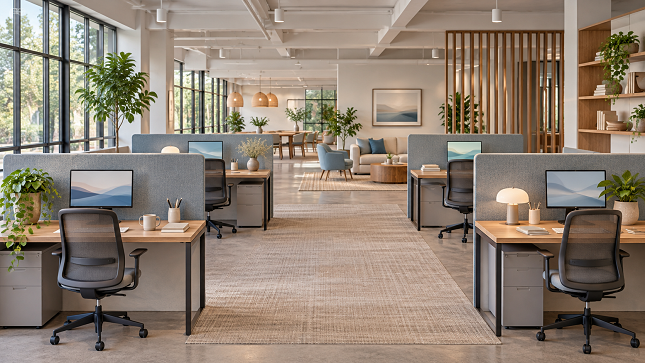
There may be plenty of floor space in the office as a whole, but individuals may feel that others are too close, looking over their shoulders, and so on, whilst they are on the phone or studying numbers.
So this may be less a question of available space, more a question of demarcation of areas.
Desk privacy screens can separate nearby workstations without building permanent walls or full-height cubicles. The right choice depends on which sightline needs blocking, how much movement passes each desk, and how often nearby colleagues need to speak. A screen can help set a boundary, but it should not cut off natural light or easy access to shared spaces.
Table of Contents
Decide degree of privacy required
What type or degree of screening is wanted at individual desks?
Other people moving around can be sufficiently distracting, irrespective of noise levels. Other people talking, and seeing documents on desks and screens, may also be undesirable.
All these may be present to greater or lesser degrees, but require slightly different solutions:
- seeing others at their desks and on computer screens;
- general noise levels; and
- seeing or hearing particular information.
A screen can reduce casual views of a desk. Depending on its materials and placement, it may absorb some sound, but it cannot guarantee speech privacy. They are not, however, going to provide a high degree of sound insulation, so that conversations cannot be overheard.
Leesman reported in March 2026 that just with workplace noise levels, based on survey responses collected from Q1 2022 to Q3 2025. There will therefore usually be a separate element to address noise.
So identify from where undesired views are received – people walking past, opposite desks, adjacent conversations, and so on.
This should give some indication of the most appropriate positioning and type of screens.
Provide some demarcation of individual desks
Some indication of the limit of one’s “own” area will often suffice.
So a screen between people sitting opposite each other, a side screen to prevent others walking past seeing the screen, or a rear screen to indicate the limit of the desk area, may all be useful.
The Desk Dividers Ltd’s Brighton backdrop screen, for instance, is fixed to the edge of the desk and projects both above and below it, giving good demarcation of the area occupied, but not unduly enclosing the user.
It is also worth remembering to view from occupied positions, as there may be considerable exposure to other desks or walkways, despite apparently adequate height of screen.
On the other hand, one doesn’t want to make it unnecessarily difficult to communicate with others, so it is desirable to leave some areas free for easy conversation and direct line of sight.
Position screens appropriately
Location of screens around desks can be very important.
Obvious lines of travel around and behind desks, for example, to a copier, may be more conveniently routed elsewhere. Failing that, screens may be positioned to minimise exposure, as viewed from desk height.
Depending on the type of work carried out, more or less definition of each person’s area may be desirable, with possibly a common area nearby if people want to confer with one another regularly.
Thus various combinations may be appropriate:
- A common screen for opposite desks, obscuring immediate view of each other’s screens.
- Side screens and backboards adjacent to areas frequently traversed by others, as viewed from desk level.
- Relatively greater privacy for those requiring it to concentrate, with more flexible screens to divide off others making regular telephone calls, and so on.
There may be loss of natural light, desirable views out of the room, and reduced apparent width of passageways.
Obvious routes to exits, and to commonly used facilities, should also remain unobstructed.
More privacy is unlikely to be an advantage if it unreasonably impedes movement around the area.
Appropriate size and type of screen
Various considerations will determine dimensions, materials and method of fixing.
Length and height will depend on the area of desk to be screened, viewed from the height of an occupant, or occupants if there is variable height of desks.
Method of fixing may be direct to the top of the desk, free-standing legs, or otherwise, depending on depth and configuration of desktop, space available underneath, rails available, and so on.
Other points to consider include:
- sufficient height to obscure unwanted views, but not excessively so;
- width appropriate to desk, allowing space for monitor hangers and other items;
- finishes easy to clean, aesthetically suitable, degree of sound absorption;
- adequate rigidity, having regard to amount of disturbance likely; and
- space to allow cables to other equipment.
Soft appearances can be achieved with fabrics; clear materials allow views but give minimal privacy; free-standing units will require a reasonable area of floor space.
Obvious care is needed with screens fixed to desks, where these are height variables, to allow for full range of movement.
Finally, consider harmonious colours and finishes with other desk accessories.
Reduce general noise levels
Many factors will contribute to general noise levels, and desk screens can play only a limited part.
Various types of conversation, including on the telephone, feature prominently in one survey of annoying features in offices (Parkinson et al., Buildings & Cities, 2023). People talking is obviously more distracting if it can readily be understood.
So some reduction of ambient noise may be achieved with appropriate materials and location, but this should not be over-interpreted. In particular, there is no assurance of confidentiality of conversations, with screens alone.
It would normally be preferable to have some enclosed area available for such conversations.
Thus, it may be helpful if those making frequent calls are located close to enclosed areas, others conversing informally further removed from those needing to concentrate, and full advantage taken of other features of the office which may assist sound absorption.
Common sense application by staff, such as moving to another location for extended conversation, would also be helpful.
Generally, the object would be reduction in distraction to others.
Trial a few areas first
It seems sensible to experiment at a number of desks, preferably with obvious sources of annoyance, and question users about various aspects of their work. For example, degree of awareness of people walking past, ease of contacting others, adequacy of light and space available, and so on.
Obviously, conditions would vary through the day, and may be less onerous at some times.
Some disadvantages may result, such as excessive enclosure, loss of floor space, and these need to be weighed up, and positions altered if necessary.
Clearly what may be advantageous for one group may inconvenience others, even in the same general area.
Summary
Various degrees of privacy can readily be achieved with suitable screens around desks. Identification of what is required, selection and appropriate positioning of screens, and some general precautions re: noise levels, should all go some way to improving working conditions.