





















Most business owners think their marketing works for everyone. For customers with hearing loss, vision impairment, or cognitive differences, it often doesn’t. Video without captions, images without descriptions, and forms that break without a mouse all create the same outcome. Someone who wanted to buy from you leaves instead. This guide covers what to change and where to start.
Why does inclusive marketing matter for small business growth?
Accessible marketing sits across two distinct layers, and most businesses only think about one of them. The first is what goes into your content: captions on video, descriptions on images, copy that everyone can read. The second is whether your website delivers that content without failing the people trying to access it. Keyboard navigation that breaks, form fields with no labels, and player controls that only work with a mouse are website failures, not content failures. A free accessibility scan from Welcoming Web identifies the second type across your pages in 60 seconds, without a developer.
Most businesses fix the content layer instinctively — they write copy, produce videos, design images. Almost none of them then check whether their website actually serves that content to everyone who arrives. The result is a homepage that looks complete to someone browsing normally and is a series of dead ends to anyone who is not.
The point is not charity. It is the difference between marketing that converts a slice of your potential audience and marketing that converts most of it.
What makes video marketing accessible to everyone?
Video is where most small businesses have the biggest accessible marketing gap, and where the fix is most entirely in their own hands.
Accurate captions are the first requirement. They serve deaf and hard-of-hearing viewers, everyone watching on mute, and non-native English speakers who read along to follow the content. Auto-generated captions on video platforms like YouTube and Vimeo are a starting point, not a finished product. They may miss proper nouns, product names, and accented speech — exactly the words a small business needs customers to understand. The fix takes 15 to 20 minutes for a 5-minute video: download the transcript, correct the errors in any text editor, re-upload. Synchronisation matters as much as accuracy. Captions that are correct but run two seconds behind the speech still fail.
Audio descriptions are the second requirement for videos that carry visual information. They are short narrations added into the natural pauses in a video, describing what is happening on screen. A product demo where the presenter clicks through features without describing what they are clicking needs them. A founder talking to camera does not. If a blind customer listening to your video would miss information that a sighted customer gets, audio descriptions are the fix.
What does your website need to deliver content accessibly?
Once the content is right, the website still has to deliver it without creating dead ends. These are the failures a content review will never catch — and the ones that cut off customers who have already decided they are interested.
Images across your site need descriptive alt text written in the page markup, not just a filename. A product image without alt text is invisible to a screen reader. A promotional banner labelled “IMG_4832.jpg” tells a blind customer nothing about a sale they might have bought into. Alt text is also indexed by search engines, making every missing description a lost ranking opportunity as well as a lost customer.
Form fields need labels that work for screen readers and keyboard users. A contact form where the name field is visually obvious but carries no underlying label is a dead end for anyone using assistive technology. Most of these failures are invisible in normal browser testing, which is why most businesses do not know they exist. Welcoming Web‘s page scanning surfaces them alongside contrast failures, missing labels, and inaccessible interactive elements, giving owners a specific list of what to fix rather than a guessing exercise.
How does accessible marketing help SEO and reach?
Captions give search engines something to index. A YouTube video with an accurate caption track surfaces for long-tail queries the same video relying on auto-detection misses. Alt text on every image feeds descriptive text to search engines for terms the image illustrates. Most small business websites have dozens of images with no alt text, which means dozens of missed indexing opportunities per page.
Engagement signals improve too. Captioned videos hold viewers longer because the message works in low-sound environments, and watch time is a direct input to YouTube’s recommendation algorithm. Accessible page structures pass Core Web Vitals checks more consistently. The work that removes barriers for customers and the work that improves search performance overlap more than most owners realise.
What should a small business owner do this week?
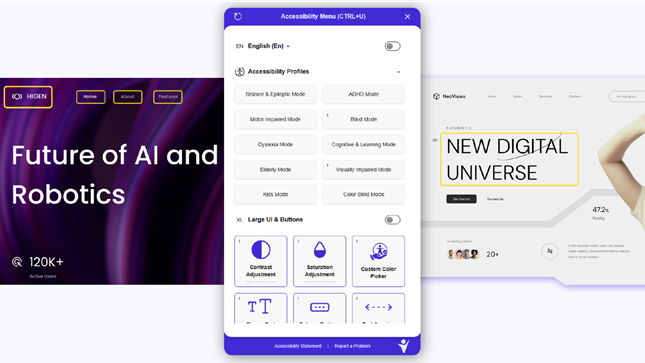
Most small businesses have no idea which pages are turning customers away at the website level. Welcoming Web is a web accessibility platform that combines page scanning, AI-assisted remediation, monitoring, and a visitor-facing accessibility widget. It shows owners the page-level failures — missing alt text, broken navigation, unlabelled fields — so they know exactly what to fix first.
A free accessibility scan from Welcoming Web shows where your site is failing the customers it could be converting, with results in 60 seconds.
Scan your website for page-level failures. A scan identifies missing alt text, broken keyboard navigation, unlabelled form fields, and inaccessible player controls across your pages. Most small business homepages have between 10 and 30 of these failures.
Edit auto-captions on every public video. Download each transcript from YouTube or Vimeo, correct proper nouns and product names, re-upload. Start with the homepage video and any video used in paid advertising.
Add descriptive alt text to every marketing image. “Woman smiling at camera” is not enough. “Small business owner reviewing her product range at a workshop bench” is.
Check that every video player works with the Tab key. Open the page, press Tab, and try to play, pause, and adjust volume without a mouse. If you cannot, the player has a settings fix that takes minutes.
Add audio descriptions to videos that carry visual information. Product demos and tutorials that show on-screen content usually need them. A talking-head video usually does not.
Build the checks into your production process. Captions, alt text, and a keyboard test take 30 minutes at publication. They take hours to fix retrospectively across an existing content library.
Frequently asked questions
Does inclusive marketing actually grow a small business audience? Accessible marketing reaches customers that inaccessible content turns away before they have a chance to buy. That group includes deaf and hard-of-hearing users, screen reader users, keyboard-only navigators, non-native English speakers reading along to video, and the far larger number watching on mute in public spaces. For most small businesses, the combined group is larger than they assume and actively buying from competitors whose content works better for them.
Do captions actually increase video views? Captioned videos hold viewers longer, particularly on mobile and social feeds where most playback starts without sound. Longer watch time feeds back into how platforms rank and recommend video. The size of the lift varies by platform and content type, but the direction is consistent across studies.
Will adding captions on YouTube improve my Google rankings? Captions improve the chance a video surfaces for long-tail search terms because the caption file is indexable text. The effect is strongest on YouTube itself. Embedded videos with accurate captions also feed text signals to the host page, which helps that page rank for topics the video covers.
Are testimonial videos worth captioning? Testimonial videos benefit from captions more than most other formats. Customers watching testimonials on mobile in public spaces usually do so on mute, and they form their impression from what they read. An uncaptioned testimonial loses its job at exactly the moment it should be working hardest.
Does accessible marketing help with non-English-speaking customers? Accurate captions and descriptive alt text help non-native English speakers follow content they would otherwise skip. Many small businesses see meaningful audience overlap between customers with accessibility needs and ESL customers, particularly in NYC where multilingual populations are large.
How long does this work realistically take? For a typical small business with 3 to 10 videos and a standard image library, captioning and alt text work fits inside a day. Player configuration changes take minutes. Audio descriptions take longer because they need scripting, recording, and mixing. Most owners are surprised by how much ground can be covered in one focused session.